Like a modern Rosetta Stone, these seven translation devices can turn any classroom into a multilingual hub. You’ll see how each model balances speed, accuracy, and offline capability, while also handling visual text and even currency conversion. The lineup isn’t just about gadgets; it’s about keeping students connected and privacy‑safe. Curious which tools truly meet a school’s diverse needs?
| AI Premium Language Translator 2026 – 150 Languages 4″ HD Touchscreen | Best Overall | Language Count: 150 languages (incl. 21 offline) | Offline Capability: 21 offline languages, offline photo translation | Camera / Photo Translation: HD camera, OCR for photo translation | VIEW LATEST PRICE | Read Our Analysis | |
| Vasco V4 Language Translator – 112 Languages Black Onyx |  | Budget-Friendly Pick | Language Count: 112 languages | Offline Capability: Offline translation, no Wi‑Fi required | Camera / Photo Translation: Image‑to‑text conversion | VIEW LATEST PRICE | Read Our Analysis |
| Pocketalk S Two-Way Voice Translator with 2-Year Built-in Data (White) | 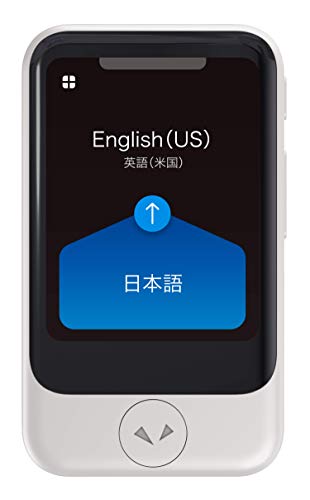 | Classroom Essential | Language Count: 92+ languages | Offline Capability: Offline voice translation via downloaded packs | Camera / Photo Translation: Camera for sign/menu translation | VIEW LATEST PRICE | Read Our Analysis |
| Upgraded AI Translator: 150+ Languages Offline Voice & Photo Translation |  | High‑Performance Choice | Language Count: 150+ languages (138 online, 17 offline) | Offline Capability: 17 offline voice languages, 40 offline photo languages | Camera / Photo Translation: 8 MP camera with flash, photo translation | VIEW LATEST PRICE | Read Our Analysis |
| iFLYTEK AI Translator: 60 Languages Real-Time Voice Offline Packs | 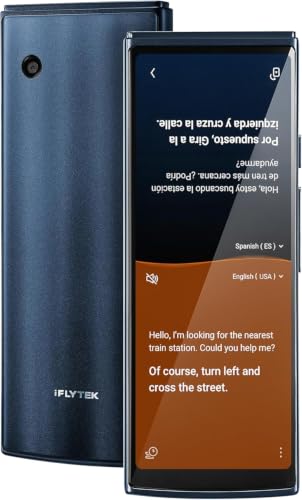 | Top Accuracy | Language Count: 60 languages (18 offline packs) | Offline Capability: 18 offline language pairs | Camera / Photo Translation: Photo translation in 50 languages | VIEW LATEST PRICE | Read Our Analysis |
| Scanmarker Pro Translation Pen for 100 Languages |  | Student‑Focused Tool | Language Count: 100 languages (online) | Offline Capability: Offline for 5 major languages (EN, ES, FR, DE, IT) | Camera / Photo Translation: Scans printed text, reads aloud | VIEW LATEST PRICE | Read Our Analysis |
| Retekess TT119 Assistive Listening System (1 Tx 30 Rx) |  | Assistive Listening Pro | Language Count: 6 language channels (simultaneous) | Offline Capability: Offline listening channels, no internet needed | Camera / Photo Translation: No camera (N/A) | VIEW LATEST PRICE | Read Our Analysis |
More Details on Our Top Picks
AI Premium Language Translator 2026 – 150 Languages 4″ HD Touchscreen
If you teach a multilingual classroom and need instant, reliable translation, the AI Premium Language Translator 2026 is the perfect fit. You’ll get real‑time two‑way voice translation in 150 languages, with 98% accuracy and a 0.5‑second response. Its 4‑inch HD touchscreen displays clear text, while the built‑in HD camera and OCR handle photo translation for menus, signs, and worksheets. You can rely on 21 offline languages when Wi‑Fi’s spotty, and the pocket‑size device runs on a 1500 mAh battery for hours. Smart recording captures meetings and lectures, making it ideal for travel, study, and international business scenarios.
- Language Count:150 languages (incl. 21 offline)
- Offline Capability:21 offline languages, offline photo translation
- Camera / Photo Translation:HD camera, OCR for photo translation
- Touchscreen / Display:4‑inch HD touchscreen
- Power / Battery:1500 mAh battery, 8.1 oz weight
- Connectivity:Wi‑Fi for online translation, LTE optional
- Additional Feature:Pocket‑size design
- Additional Feature:Smart meeting recorder
- Additional Feature:1500 mAh battery
Vasco V4 Language Translator – 112 Languages Black Onyx
Educators who need instant, reliable multilingual support in the classroom will find the Vasco V4 Language Translator a perfect fit. You’ll appreciate its 112‑language voice engine, which delivers spoken translations the second screen and image‑to‑text conversion for printed materials. The black onyx device is plug‑and‑play, requiring no Wi‑Fi, app, or subscription, and it stays connected in nearly 200 countries via free lifetime internet. At 2.17 × 0.39 × 5.87 inches and 4.7 oz, it’s lightweight enough to carry between desks, powered by a single lithium‑ion battery. Though rated 3.8 stars, it ranks high among electronic translators, making it a solid classroom addition.
- Language Count:112 languages
- Offline Capability:Offline translation, no Wi‑Fi required
- Camera / Photo Translation:Image‑to‑text conversion
- Touchscreen / Display:No touchscreen (LED indicators)
- Power / Battery:1 Li‑ion battery, 4.7 oz
- Connectivity:Free lifetime internet in ~200 countries, no Wi‑Fi needed
- Additional Feature:Lifetime free internet
- Additional Feature:Plug‑and‑play setup
- Additional Feature:Black Onyx finish
Pocketalk S Two-Way Voice Translator with 2-Year Built-in Data (White)
The Pocketalk S shines for teachers who need instant, reliable multilingual support in bustling classrooms, because its real‑time translation covers 92+ languages and includes a 2‑year LTE data plan that works in over 140 countries. You’ll appreciate its pocket‑size design—just over two inches tall and weighing 2.65 oz—so it never clutters a desk. Its camera snaps signs or menus and overlays translations directly on the image, while automatic PIN locks and history deletion protect student privacy. Real‑time conversion of currency, length, weight, and temperature lets you demonstrate math concepts on the fly. Frequent software updates keep the device current, and the pronunciation mode helps learners practice speaking.
- Language Count:92+ languages
- Offline Capability:Offline voice translation via downloaded packs
- Camera / Photo Translation:Camera for sign/menu translation
- Touchscreen / Display:Small screen for translated text
- Power / Battery:1 Li‑ion battery, 2.65 oz
- Connectivity:2‑year LTE cellular data plan
- Additional Feature:PIN lock security
- Additional Feature:Currency & unit conversion
- Additional Feature:Pronunciation practice mode
Upgraded AI Translator: 150+ Languages Offline Voice & Photo Translation
With its lightning‑fast 0.5‑second response and 98% real‑time accuracy, the upgraded AI Translator is the go‑to tool for teachers who need instant, reliable multilingual support in the classroom. You’ll get over 150 languages, 138 online and 17 offline for voice, plus photo translation in 74 online and 40 offline languages. The 100‑gram, 3‑inch HD touch screen device stays cool even after hours of use, and the 8 MP flash camera snaps text for instant translation. Physical and touch buttons let you switch modes quickly, while OTA updates keep features fresh. It also runs ChatGPT, handles currency exchange, and converts units—perfect for lessons, trips, and real‑world projects.
- Language Count:150+ languages (138 online, 17 offline)
- Offline Capability:17 offline voice languages, 40 offline photo languages
- Camera / Photo Translation:8 MP camera with flash, photo translation
- Touchscreen / Display:3‑inch HD touchscreen
- Power / Battery:100 g, battery (type unspecified)
- Connectivity:OTA updates, Wi‑Fi for offline package download
- Additional Feature:ChatGPT integration
- Additional Feature:OTA firmware upgrades
- Additional Feature:Dual‑mode buttons
iFLYTEK AI Translator: 60 Languages Real-Time Voice Offline Packs
If you need instant, accurate multilingual communication in a classroom, iFLYTEK’s AI Translator delivers 60 languages, real‑time split‑screen voice translation, and 18 offline packs that keep lessons flowing even without internet. Its 5.05‑inch HD touchscreen makes operation intuitive, and the 0.3‑second response time feels natural. You’ll see 98 % accuracy, and photo translation works in 50 languages for visual aids. The device supports Wi‑Fi, hotspot, and other networks, automatically saving up to 1,000 records for later export. Certified by OMNIA and HIPAA, it includes a 12‑month warranty, 24/7 support, OTA updates, a 6‑hour translating window, and a 10‑day standby battery.
- Language Count:60 languages (18 offline packs)
- Offline Capability:18 offline language pairs
- Camera / Photo Translation:Photo translation in 50 languages
- Touchscreen / Display:5.05‑inch HD touchscreen
- Power / Battery:1 Li‑ion battery, 5.05‑inch screen
- Connectivity:Wi‑Fi, hotspot, cellular options
- Additional Feature:Split‑screen view
- Additional Feature:HIPAA‑certified healthcare
- Additional Feature:5.05‑inch HD touchscreen
Scanmarker Pro Translation Pen for 100 Languages
Dyslexic learners and ESL students will benefit most from the Scanmarker Pro, a lightweight pen that scans text, reads it aloud, and highlights each word on screen. You’ll appreciate its 600‑dpi USB scanner, Bluetooth link, and support for A4 and letter pages—all in a 0.23 kg device. It translates over 100 languages online and offers offline English, Spanish, French, German, and Italian, plus a built‑in English dictionary. Smart note‑taking and recording let you capture ideas instantly. The pen’s portability fits any desk, and the one‑year warranty with Amazon’s 30‑day return gives peace of mind. Reviewers rate it 3.9 stars, placing it high among language translators.
- Language Count:100 languages (online)
- Offline Capability:Offline for 5 major languages (EN, ES, FR, DE, IT)
- Camera / Photo Translation:Scans printed text, reads aloud
- Touchscreen / Display:No touchscreen (LED/phone app)
- Power / Battery:USB‑powered, rechargeable, 0.23 kg
- Connectivity:Bluetooth to companion app, online translation
- Additional Feature:Built‑in English dictionary
- Additional Feature:Real‑time audio reading
- Additional Feature:Smart note‑taking
Retekess TT119 Assistive Listening System (1 Tx 30 Rx)
The Retekess TT119 is perfect for classrooms where you need reliable, multilingual audio support for up to 30 listeners, because its 17‑channel system lets you broadcast up to six languages simultaneously while maintaining crystal‑clear stereo sound up to 300 m away. You’ll appreciate its one‑click mute, lock, recording, and pause controls, plus automatic pairing that eliminates setup hassle. Lightweight 90‑gram receivers run ten hours on two AA batteries, and the transmitter reaches 300 m, covering large halls. With XLR, AUX, RCA, and USB inputs, you can connect any source. Use it for assemblies, language labs, or guest speakers, ensuring every student hears clearly.
- Language Count:6 language channels (simultaneous)
- Offline Capability:Offline listening channels, no internet needed
- Camera / Photo Translation:No camera (N/A)
- Touchscreen / Display:No touchscreen (LED indicators)
- Power / Battery:2 AA batteries, 90 g receiver
- Connectivity:RF transmission (up to 300 m), no internet required
- Additional Feature:Stereo sound option
- Additional Feature:One‑click mute/record
- Additional Feature:300 m range coverage
Factors to Consider When Choosing Translation Devices for Schools
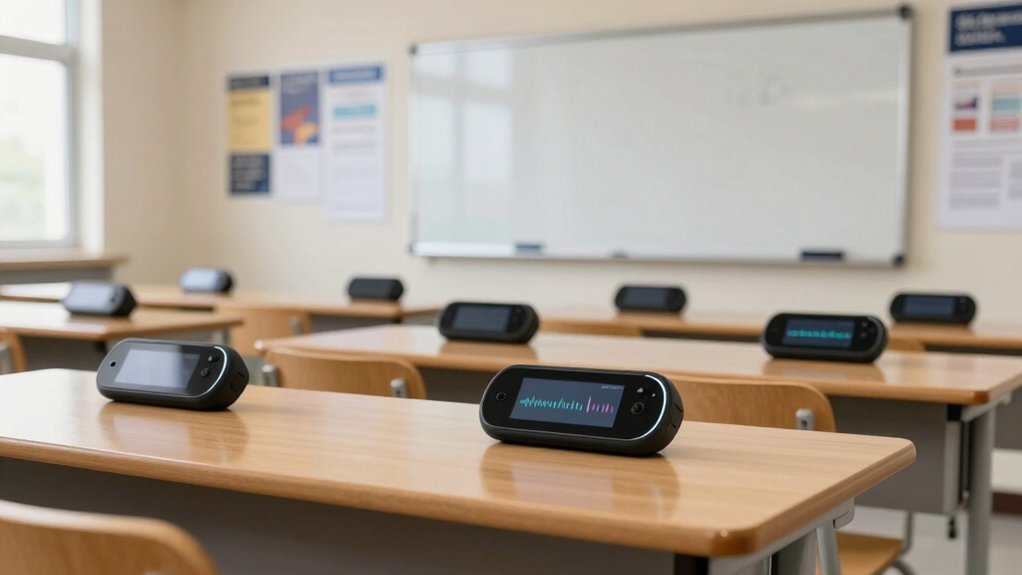
When you pick a translation device, you’ll want high accuracy with low latency so conversations flow naturally. Make sure it works offline, lasts through a full school day on a single charge, and can survive drops and spills. Finally, a simple interface lets teachers and students start using it right away.
Accuracy Accuracy and Latency
Most schools need translation devices that deliver at least 95% accuracy and respond within half a second, because any lag or misinterpretation can disrupt lessons. You’ll notice that a 95% threshold eliminates most mistranslations, keeping discussions coherent and students engaged. When a device translates in 0.5 seconds or less, dialogue flows naturally, and teachers can maintain momentum without pausing to clarify. Look for models that benchmark both accuracy and latency under classroom conditions, not just lab settings. Regular firmware updates will sustain that high performance as language nuances evolve. Prioritize hardware that processes speech locally, ensuring the processor can meet the sub‑second response time consistently, even during peak usage. This balance of precision and speed keeps learning uninterrupted.
Offline Functionality Importance
If your school’s internet is spotty or unavailable, you’ll need a translation device that works offline so language support never drops. Offline capability guarantees that lessons continue uninterrupted, whether you’re in a rural classroom, a field‑trip bus, or an emergency shelter. Choose a device that stores language packs locally, covering the major languages spoken by your students and staff. Look for easy updates that let you add new packs without a constant connection, ensuring the curriculum stays inclusive. Verify that the device’s interface works without Wi‑Fi, so teachers can trigger translations instantly during activities. By prioritizing robust offline databases, you protect learning from network hiccups and keep communication seamless across every educational scenario.
Battery Life Requirements
Even a short power outage can stall a lesson, so you need a translation device that lasts at least six hours on a single charge. Look for models with rechargeable batteries that support fast charging; that way you can top them up during a break and keep the class moving. Power‑saving modes or automatic standby when the device isn’t in use stretch runtime, especially when multiple students share one unit. Remember that more simultaneous users drain the battery faster, so factor class size into your choice. Keep a backup plan handy—portable chargers or devices that accept standard AA/AAA cells give you a safety net if the main battery runs low. Prioritizing these features guarantees smooth, uninterrupted multilingual instruction.
Device Durability Standards
When you pick a translation device for a classroom, you’ll want it to pass rugged‑ness tests like MIL‑STD‑810 so it can survive drops, shocks and everyday wear. Look for housings with reinforced corners and ports; they keep the device intact when students toss or bump it. Spill‑resistant, wipe‑clean surfaces protect against accidental drinks or marker ink, while tamper‑evident construction and lockable enclosures deter theft and unauthorized access in shared spaces. Choose models that hold a charge all day and support fast charging, so you won’t scramble for power mid‑lesson. These durability features guarantee the device stays functional, safe, and ready for multilingual instruction without constant maintenance.
User Interface Simplicity
A clean, intuitive interface is the backbone of any classroom translation device, letting teachers and students jump straight into learning without wrestling with tech. You’ll want easy‑to‑navigate menus, clearly labeled buttons, and a responsive touch screen that reacts instantly to taps. Offer multiple input methods—voice commands for hands‑free use and physical buttons for those who prefer tactile feedback—so every learner can engage comfortably. Keep language selection, volume control, and essential settings front‑and‑center, using simple icons and consistent layouts across models. When the design stays uniform, you reduce the learning curve and let users switch devices without missing a beat. This streamlined approach boosts adoption, saves class time, and lets you focus on instruction rather than troubleshooting.
Multi‑User Collaboration Features
If you want students to collaborate seamlessly, choose a device that supports real‑time shared screens, simultaneous text entry, and cloud‑based user accounts with granular permissions. Look for tools that let teachers and learners edit the same document while seeing each other’s cursor movements, so group projects stay synchronized. Cloud platforms should enable easy sharing of transcripts, captions, and live interpretations, helping multilingual classrooms stay inclusive. Make sure the system offers version control and collaborative annotation, so feedback is tracked and revisions are clear. Permissions must be fine‑tuned, allowing teachers to lock or open sections for specific groups. These features turn a simple translation gadget into a dynamic learning hub that encourages peer interaction and collective language practice.
Data Privacy Compliance
Choosing a translation device that meets FERPA, COPPA, and other education‑specific privacy laws is essential, so you’ll need to verify its security safeguards right away. First, confirm the vendor provides end‑to‑end encryption and strict access controls that keep student data locked down. Look for a clear, written privacy policy that aligns with school‑district requirements and explains data handling, storage, and deletion. Prefer devices that can operate offline, reducing exposure to cloud‑based leaks. Ask the provider to share recent security audit reports and a schedule for regular software updates. Finally, guarantee you have a process for ongoing compliance checks, so any new feature or firmware change stays within legal bounds. This diligence protects learners and keeps your school audit.